


A Google Business Account is the only free profile that enables your business to show up in the Google Search and Google Maps results. You start by signing in and adding your company name, business category, and address; then you have to validate your business. This article explains how to create a Google Business Profile account step by step, from creation to verification.
You probably have a reason for being here. Maybe a customer said they couldn’t find you online, or a competitor keeps showing up on the map. Either way, you can make a Google Business account in under an hour, and Octaads Media will show you how to manage Google Business account tasks without losing your weekends.
We’ll also cover Google My Business optimization, the small habits that help you climb the map results over time. If you need to create a Google Business account for local business use, whether that’s a shop, a clinic, or a service van, the steps below apply to you.
What Is a Google Business Account and Why Does It Matter?
When potential customers search online for immediate local services or products, search engines feature only the top verified map profiles. Unoptimized or missing listings go unnoticed during critical purchasing decisions, directly handing high-intent foot traffic and potential revenue to fully configured competitors.
A Google Business account fixes that. It gives you control of the profile people see on Google Search and Maps, from your opening hours to your photos, reviews and phone number. Google calls it a Business Profile, though many owners still call it a Google Maps listing, and both mean the same thing.
- Your business name, address and phone number appear on Maps and Search
- Customers can call you, get directions or visit your website in one tap
- You can reply to reviews and post updates
- You can see how many people found you and contacted you
That last point is the one owners skip. Your dashboard turns a vague worry about visibility into numbers you can read. At Octaads Media, we often see owners ignore it for months and then wonder why nothing is moving.
How to Create a Google Business Account: Step-by-Step Setup
This is what you’ve been waiting for. This step-by-step Google Business Account setup tutorial should take approximately 30 minutes to complete once you have collected all the necessary information about your business. Be prepared to provide the name of your business, its location (address), its telephone number, and the days/hours it operates.
- Log in with a Google account. It should be a separate account for the business, not your own personal Gmail. When one of your employees leaves, you do not want to lose access to the profile because it is tied to their login.
- Open Google My Business (at business.google.com) to begin adding your company.
- Please use the name that is listed on your sign exactly. Do not include any additional keywords.
- Select a main area of your business activity, for example, “Bakery” or “Plumber.”
- In order to have customers find you, please include either your physical address or select “Service Area” to indicate that you will be traveling to meet with them.
- Enter your phone number and website, then check both twice.
- Choose a verification method from the options Google shows you.
- Once verified, add your hours, services, a short description and real photos.
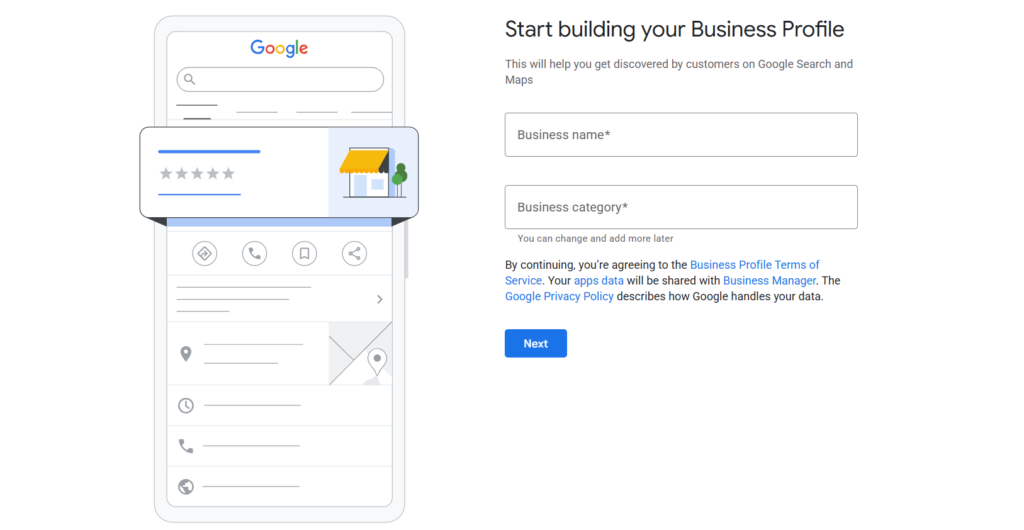
Most business owners skip the first two steps of the setup process (name & address), and that’s when problems begin. Even a minor discrepancy between your online listing and the physical sign on your storefront could delay your ability to verify your listing at a later date. The Google Business Profile setup will only go smoothly if the information you provide matches exactly what a potential customer will see when they arrive at your location.
How to Claim an Existing Google Business Profile
You might look up your company and realize it is already listed, perhaps created by a customer or maybe Google itself. In such a case, don’t create another Google Business Profile in the same place, since that would split your reviews and result in both of them being penalized.
- Check your company’s name using Google Maps when you are logged in
- Make your selection on the list and click <Suggest an edit> and <Own this business?>) to get more info about a business
- Select your way of verification and carry on
- If another person is registered, you can access it by requesting them and wait for the reply
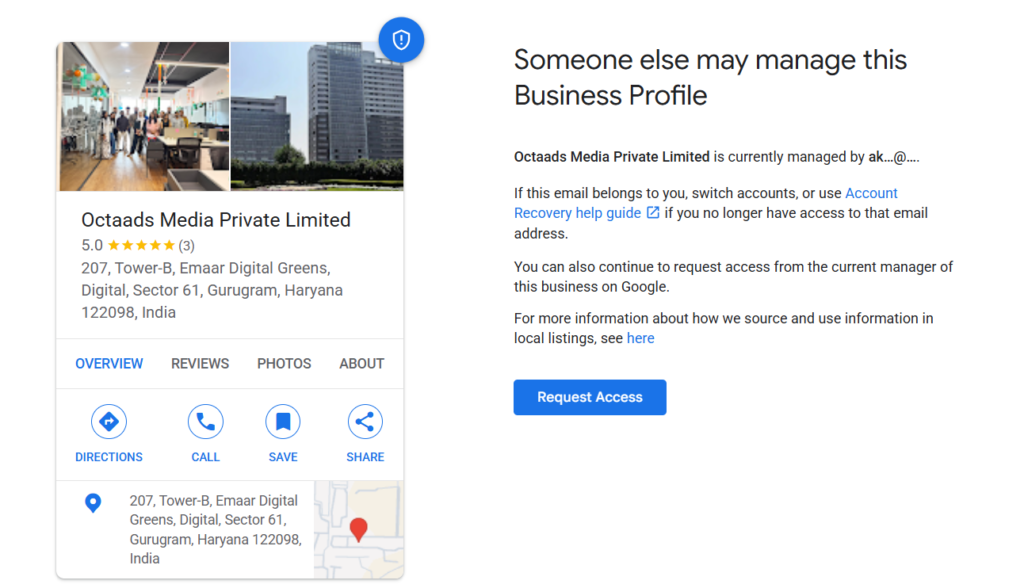
One might experience a situation where it seems like an effort was completely fruitless for instance, the previous owner had been a former employee or a web designer who was no longer working with them. Keep all the documents verifying the ownership of the company close at hand and just sit back. The whole thing happens on different time scales, but Google does not promise results. You won’t have messy duplication problems by knowing how to properly claim already existing Google Business Profile listings.
How to Verify Google Business Profile Without a Postcard
Verification is where most owners get stuck. You wait for a postcard that never arrives, or you record a video that gets rejected. It’s frustrating, and it happens to a lot of people. The postcard method still exists. Codes usually arrive within 14 days and expire after 30. But Google often offers faster options.
Google Business Profile verification methods at a glance
Method How it works Typical speed Watch out for Video recording You record a clip showing your location, signage and proof you run the business Review can take up to 5 business days; some finish instantly Cuts, poor lighting or missing signage lead to rejection Phone or text Google sends a code to your business number Usually within minutes Not offered to every business Email You follow the steps in an email sent to the address Google lists Usually quick Only available for some profiles Live video call A Google representative guides you through a call on your mobile Depends on appointment slots Needs your phone and a quiet moment at the business Postcard Google mails a code to your business address Most arrive within 14 days; code expires after 30 Not available for all businesses; don’t edit your details while waiting
| Method | How it works | Typical speed | Watch out for |
| Video recording | You record a clip showing your location, signage and proof you run the business | Review can take up to 5 business days; some finish instantly | Cuts, poor lighting or missing signage lead to rejection |
| Phone or text | Google sends a code to your business number | Usually within minutes | Not offered to every business |
| You follow the steps in an email sent to the address Google lists | Usually quick | Only available for some profiles | |
| Live video call | A Google representative guides you through a call on your mobile | Depends on appointment slots | Needs your phone and a quiet moment at the business |
| Postcard | Google mails a code to your business address | Most arrive within 14 days; code expires after 30 | Not available for all businesses; don’t edit your details while waiting |
Here’s the honest part. Google decides which options you see, based on your business type, region and public information. You can’t always choose. So the realistic way to skip the postcard is to take the best option that shows up. If the postcard is the only one, you wait.
What to Do When Video Verification Fails
If your video gets rejected, don’t panic. It usually means Google couldn’t see enough. A shaky clip of your front door won’t do it.
- Show the street outside and your signboard in one continuous take
- Walk inside and show your work area, stock or equipment
- Show proof that you run the place, such as a business license or the tools of your trade
- Don’t edit or cut the clip
If you get a Review issues notice, follow the on-screen prompts and resubmit. It’s a fixable problem, not a verdict on your business.
Setup Mistakes That Can Get Your Profile Suspended
Unexpected suspensions often occur shortly after successful verification. These profile drops typically stem from minor compliance oversights, such as using unverified addresses or inconsistent business names across directory listings.
- Stuffing keywords into your business name
- Using a P.O. box or a virtual office as your address
- Choosing a category that doesn’t match what you really do
- Changing your name, address or category while a postcard is on its way
- Listing different phone numbers on your website and your profile
How to Manage Google Business Account Activity Without Burning Out
Getting your Google Business Account verified isn’t the finish line. It’s the starting gun. To manage Google Business Account tasks well, you don’t need hours. You need a routine you can repeat every week.
- Reply to new reviews, good and bad, within a couple of days
- Add a few fresh, real photos
- Post an update, offer or event
- Check holiday hours before they matter
- Answer questions customers leave on your profile
Google My Business Optimization That Actually Helps
Good Google My Business optimization is mostly about being accurate and complete, not clever.
- Choose the most specific primary category, then add secondary ones that are true
- Write a plain description of what you do and where
- List your services and products
- Ask happy customers for reviews, but never pay for them
- Keep your name, address and phone number the same everywhere
None of this is flashy. Google simply tends to favour profiles that look cared for and consistent.
Tracking Results with Google Search Console
Your Business Profile dashboard shows how many people searched for you, called you or asked for directions. Google Search Console covers the website side, showing which searches bring people to your pages. Use both, and link your website on your profile. Give it a few weeks to a couple of months before judging progress in the local pack. Competition sets the timeline, and nobody can honestly promise faster.
Should You Handle Your Google Business Account Yourself or Hire Help?
There’s no single right answer. It depends on your time, your budget and how crowded your area is.
DIY versus working with an agency
Factor Do it yourself Work with an agency Cost Free, apart from your time Monthly fee, varies by scope Time A few hours to set up, then about 15 to 30 minutes a week Mostly handled for you; you approve key decisions Skill needed Basic comfort with Google tools and following guidelines None on your side Best for Single-location businesses in low-competition areas Multi-location or competitive markets, or owners short on time Main risk Missed updates and avoidable suspensions Choosing a provider who over-promises
| Factor | Do it yourself | Work with an agency |
| Cost | Free, apart from your time | Monthly fee, varies by scope |
| Time | A few hours to set up, then about 15 to 30 minutes a week | Mostly handled for you; you approve key decisions |
| Skill needed | Basic comfort with Google tools and following guidelines | None on your side |
| Best for | Single-location businesses in low-competition areas | Multi-location or competitive markets, or owners short on time |
| Main risk | Missed updates and avoidable suspensions | Choosing a provider who over-promises |
Setting up your Google Business account is only the first step toward appearing in the local pack. Your website content and technical health matter too, which is where custom Search Engine Optimization services come in. And if weekly updates, review replies and listing upkeep start to feel like a second job, full-service digital marketing solutions can take that load off you.
Final Thoughts: Your Google Business Account Is Worth the Hour
You can set up a Google Business Account for free in less than one hour, and it has been reported that it is the decisive factor that can bring a new nearby customer to you rather than a competitor. Get started by collecting the necessary details. Be sure to input them just like they appear in real life and then finally select the most suitable verification method available through Google!
After that, steady habits matter more than big moves. Keep answering reviews, updating regularly, and monitoring the results of your activities each month. At Octaads Media, it seems that profiles achieve the highest growth rates when the owners look upon them as a dynamic part of the business.
If you’d like a second pair of eyes on your profile, or a team to run it, we’re a message away. Either way, you now have everything you need to take the first step today.
Frequently Asked Questions
A Google Business account is a free profile that lets you control how your business appears on Google Search and Maps. You manage your hours, photos, reviews and contact details from one place, which helps nearby customers find and contact you.
Yes. You can create a Google Business account and manage it at no cost. Google only charges if you choose to run paid Google Ads. Avoid any site that asks for payment just to register or list your business.
Postcards usually arrive within 14 days, and the code expires after 30. Video and other methods can finish instantly or take up to five business days for review. The time depends on which option Google offers your business.
To verify Google Business Profile details without a postcard, choose video, phone, text, email or live video call if Google offers them. Options depend on your business type and region, so you can’t always pick freely.
Search your business on Google Maps while signed in, select the listing, then click Claim this business or Manage now. Choose a verification method. If another owner exists, request access and wait for their response before Google decides.
Most businesses need several weeks to a few months of accurate details, steady reviews and regular updates. The timeline depends on local competition. No agency or tool can honestly guarantee a specific spot in the Google local pack.
Disclaimer
This article is for general information only. Google’s verification options, policies and interface can change, so check Google’s official Business Profile Help for the latest rules. Results from any local SEO effort vary by industry, location and competition, and no ranking is guaranteed.
Leave A Comment